Ten seconds back.
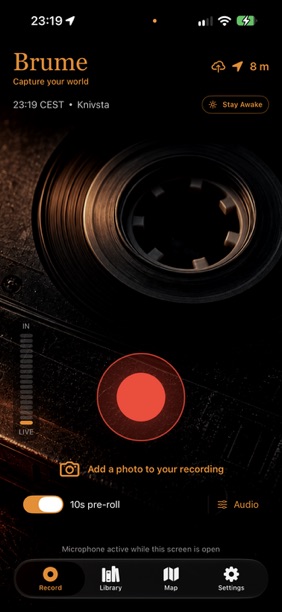
Optional 10-second pre-roll keeps a rolling buffer while the Record screen is open, so the sound just before you tap Record can become part of the take.
02 / Capture
In developmentCapture your world.
A sound in the street. A room’s quiet hum. Brume keeps the recording and its story together: the place, your notes, a photo, and the moments you marked along the way.
Brume is French for mist or haze. I chose the name simply because I liked the word.
Record on iPhone & iPad · Organise on Mac
Out in the world
A field recording is more than an audio file. Keep the details that bring you back to the moment.
Optional 10-second pre-roll keeps a rolling buffer while the Record screen is open, so the sound just before you tap Record can become part of the take.
Monitor levels and clipping, adjust input gain, and select a supported built-in microphone or connected input. Record mono or stereo where the input supports it.
Keep location, notes, tags, recording markers, and an optional photo alongside each take. Name it while the memory is still fresh.
Search and filter the library, browse recordings on a map, or jump to a marker in the waveform. Pick up the sound where you left it.
Choose AAC, ALAC, or 24-bit WAV recording. Share a WAV or compact M4A from your phone, with recording time and location included in the export filename.
Keep local recordings and a private iCloud copy. Brume on Mac downloads takes for offline work; titles, notes, tags, and projects sync between the apps on the same iCloud account.
From field to studio
Record, add markers and notes, then review the take with its waveform, photo, and map. Everything starts with the sound in front of you.
Search the library, organise by project and tags, and select a region in the waveform. Export or drag a 24-bit WAV selection into your DAW or Finder without overwriting the original. The Mac app is a library and editing companion, not a recorder.
The companion remote is being developed to start and stop the paired iPhone recorder and add markers. Audio stays on the iPhone; this is not a standalone Watch recorder. Paired-device testing is still in progress.
Brume is in development. These features and screens belong to a pre-release build and may change before launch. A public download is not available yet.